
Version: 1.1.4.1023
Developer: Bible Now Group
 Verified App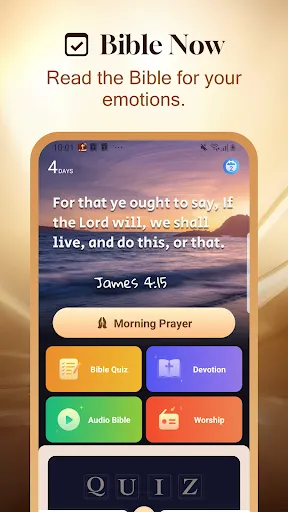



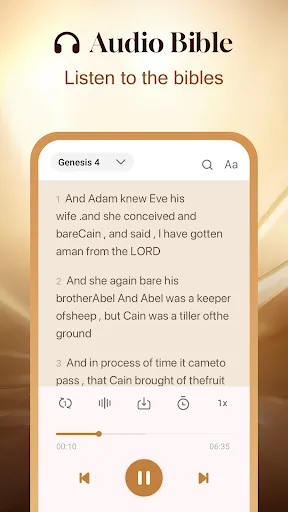

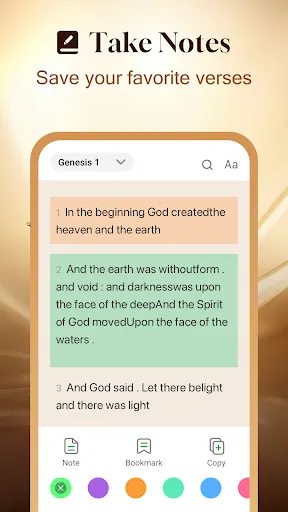

"Holy Bible Time-Verses&Audio" is a comprehensive application designed for users seeking a deeper connection with the scriptures. One of its standout features is the audio functionality, which allows users to listen to verses being read aloud, making it easier to absorb the teachings while multitasking or during commutes. The app also offers a user-friendly interface that enables easy navigation through different books and chapters of the Bible.
Additionally, the app includes daily verse notifications, encouraging users to engage with scripture regularly. Users can highlight and bookmark their favorite passages, creating a personalized experience. The search feature allows for quick access to specific verses or topics, enhancing the study experience. Furthermore, the app supports multiple translations, catering to diverse preferences and enhancing understanding. Overall, "Holy Bible Time-Verses&Audio" combines accessibility with functionality, making it a valuable tool for both casual readers and serious students of the Bible.
Using "Holy Bible Time-Verses&Audio" is straightforward and user-friendly. Upon downloading the app, users can create an account or explore the features as a guest. The main interface presents a clean layout where users can easily navigate through the various books of the Bible. To start, simply select a book and chapter to read or listen to the verses. The audio feature can be activated with a single tap, allowing users to listen to the scripture being read aloud.
For those looking to engage more deeply, the app offers options to highlight, bookmark, and take notes on specific verses. Users can also set daily reminders to receive notifications for new verses, fostering a habit of regular scripture reading. The search function is particularly useful for finding specific passages or themes quickly. Overall, the app is designed to enhance the user experience, making it easy to incorporate Bible study into daily life.
The "Holy Bible Time-Verses&Audio" app comes with several advantages that make it appealing to users. One of the primary pros is its audio feature, which allows users to listen to scripture, making it accessible for those who prefer auditory learning. The app's user-friendly interface and easy navigation enhance the overall experience, allowing users to find verses quickly. Additionally, the ability to highlight and bookmark passages helps users personalize their study, while daily verse notifications encourage consistent engagement with the Bible.
However, there are some drawbacks to consider. Some users may find that the app lacks certain advanced study tools, such as in-depth commentaries or cross-references, which could limit deeper theological exploration. Additionally, while the app supports multiple translations, it may not include every version available, which could be a downside for users with specific preferences. Lastly, the reliance on technology means that users need a stable internet connection for certain features, which may not always be available. Balancing these pros and cons can help users determine if the app meets their spiritual needs.

 Experience scripture through engaging audio narrations for deeper understanding. Access time-structured verses for daily reflection and inspiration. Enjoy a user-friendly interface for seamless navigation and usage. Enhance your spiritual journey with customizable reading plans and reminders. Connect with a community for shared insights and encouragement in faith.
 Limited user interface may hinder navigation and engagement. Audio quality can vary, affecting comprehension and enjoyment. Lack of diverse translations may restrict accessibility for some users.
  Google Play
  App Store
 Yes, users are encouraged to submit suggestions or feedback through the app's support section or via the official website, helping to improve future updates and features.
The app adheres to privacy policies and does not collect personal data without user consent, ensuring a secure experience for users.
Yes, Holy Bible Time-Verses&Audio allows users to download specific Bible translations and audio files for offline access, making it convenient for use without an internet connection.
Users can cancel their subscription directly through their app store settings or account management options within the app, following the provided instructions.
Subscription costs may vary depending on the chosen plan, but users can typically expect a monthly or yearly fee for premium access to additional features.
Customer numbers are unique and cannot be changed. If you have concerns, please reach out to customer service for further assistance.
You can reach customer service through the app's support section or by emailing support
To activate your account, follow the link sent to your email upon registration. If you didn't receive it, check your spam folder or contact customer service.
You can update your account information by logging in and going to the settings section. For further assistance, contact customer service.
Our customer service typically responds within 24 hours. Please be patient, and check your spam folder for replies.