Category: Productivity
Developer: Gamma Play
 Verified App


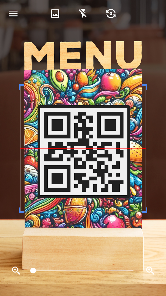
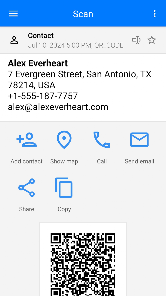
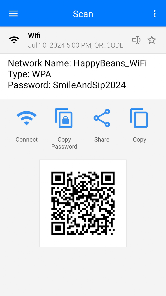
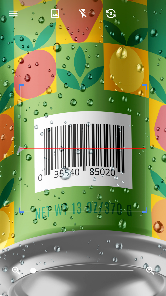
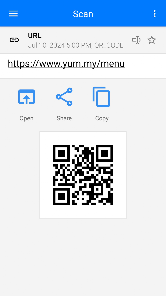
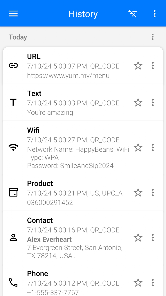
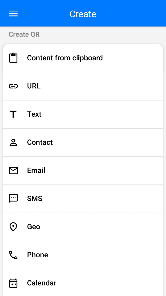
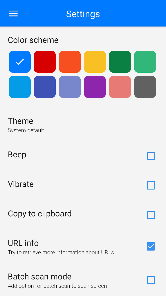
"QR Scanner - Barcode Reader" is a versatile application designed to enhance the user experience when scanning QR codes and barcodes. One of its standout features is its ability to quickly and accurately scan various types of codes, including QR codes, UPC, EAN, and more. The app boasts a user-friendly interface that allows for seamless navigation, making it accessible for users of all ages. Additionally, it supports scanning from images saved in the device's gallery, providing flexibility for users who may not have the code readily available in front of them.
Another notable feature is the app's history log, which keeps track of all scanned codes, allowing users to revisit previously scanned items easily. The app also includes a built-in flashlight function, enabling users to scan in low-light conditions without any hassle. Furthermore, it offers options to share scanned information via social media or messaging platforms, enhancing connectivity and convenience. Overall, "QR Scanner - Barcode Reader" combines functionality with ease of use, making it a reliable tool for anyone needing to scan codes regularly.
Using "QR Scanner - Barcode Reader" is a straightforward process that requires minimal effort. First, download and install the app from your device's app store. Once installed, open the application, and you will be greeted with a simple interface featuring a scan button. To begin scanning, point your device's camera at the QR code or barcode you wish to read. Ensure that the code is well-centered within the camera frame for optimal scanning results.
The app will automatically detect the code and display the relevant information on your screen. If the code contains a URL, you will have the option to open it directly in your web browser. For barcodes, the app may provide product details, pricing, and availability, depending on the database it accesses. If you prefer to scan codes from images, simply select the gallery option and choose the desired image. The app will process the image and extract the code information. With these simple steps, you can efficiently utilize "QR Scanner - Barcode Reader" for all your scanning needs.
"QR Scanner - Barcode Reader" comes with several advantages that make it a popular choice among users. One of the primary pros is its speed and accuracy in scanning various types of codes, which enhances user efficiency. The app's intuitive interface is another significant benefit, allowing users to navigate effortlessly without any technical knowledge. Additionally, the history log feature is invaluable for users who frequently scan codes, as it provides easy access to previously scanned information. The built-in flashlight is also a great addition, enabling users to scan in dimly lit environments.
However, the app is not without its drawbacks. Some users have reported occasional issues with scanning certain codes, particularly if they are damaged or poorly printed. Additionally, while the app is generally free, some features may require in-app purchases or ads, which can detract from the overall user experience. Furthermore, the app's reliance on an internet connection for certain functionalities may limit its usability in areas with poor connectivity. Overall, while "QR Scanner - Barcode Reader" offers a robust set of features, potential users should weigh these pros and cons before deciding to download the app.

 Quickly access information by scanning QR codes or barcodes with ease. Save time on manual data entry with instant scanning technology. Enhance efficiency in inventory management through real-time tracking. Simplify payment processes by scanning codes for quick transactions. Enjoy a user-friendly interface that caters to all skill levels.
 Limited functionality beyond scanning, often requiring additional apps for full use Privacy concerns arise from data collection and tracking Reliance on camera quality, affecting performance in low-light conditions
  Google Play
  App Store

When scanning a QR code, an ad will come up in middle of screen. I didn't realize this was an ad so I clicked on Open and put in my credit card to pay for parking. Well, turns out it was not the parking site I was on. it was a fraudulent company that charged my credit card on 2 separate occasions days apart and my bank notified me and I had to cancel credit card. Stop letting fraudulent companies advertise on your app!!
It works as described. I do have a problem with the way the advertisements are set up on the page after you scan a qr code. Like other people have said, there is a blue "open" button between the picture of the code and the address, that looks like it will open up the link you scanned. It instead opens up an advertisement link in your browser. I don't believe it is an intentional scam, but it is definitely an issue that needs to be addressed. It is on this app, no mistake (like support has said).
Like many others have stated, the App plaves it's ads in a way that causes you to mistakenly click them, which lead to me having to replace my debit card. And for the likely reply I'll get to tgis no it's not because of the QR Code I scanned and yes your app is free and having ads isn't a bad thing but put them at the very top of the app not dead center with a huge blue "Open" button. Seriously, that's uncalled for. Also, before it's said no, I did not confuse this app for another one.
Similar complaint as other users have said. When I scanned a QR, it brought up two links. One link with a big blue button that was actually an ad. The other link which was the one I wanted, was much more inconspicuous. I was in a rush trying to pay for parking. I accidentally opened the ad link thinking it was to pay for parking. I foolishly filled out the form and entered my credit card info. Now, my bank account has been hacked because the link is a scam site. 1 star for hosting a scam.
I don't care for the way the ads are presented after scanning a code: Ads are in the middle of the screen, with a large blue button, while the actual scanned link is an inconspicuous url at the top. I feel like this intentionally misleads users into clicking on the ads, and I will be uninstalling because of it. The scanning capability itself works fine.
Review Source: Google Play store public user reviews.
Yes, users can submit suggestions or feedback through the app's support section or by contacting the development team via email.
QR Scanner - Barcode Reader respects user privacy and does not collect personal data without consent.
Yes, QR Scanner - Barcode Reader can function offline, allowing users to scan codes without an internet connection.
To cancel your subscription, you can go to your device's settings, access the subscription management section, and follow the prompts to cancel.
Subscription costs for QR Scanner - Barcode Reader may vary depending on the plan chosen, typically offering monthly or yearly options.
Yes, contact customer service, and they can assist you in retrieving your customer number after verifying your identity.
Yes, you can log in on multiple devices using the same credentials, but ensure you log out on devices you no longer use.
You can reach customer service through the app's help section or by emailing support
Follow the activation link sent to your email after registration. If you didn't receive it, check your spam folder or request a new link.
Use the feedback option in the app or email support
Thanks for using QR & Barcode Scanner! We bring updates to Google Play regularly to constantly improve speed, reliability, performance and fix bugs.