
Version:
Developer: Apple
 Verified App
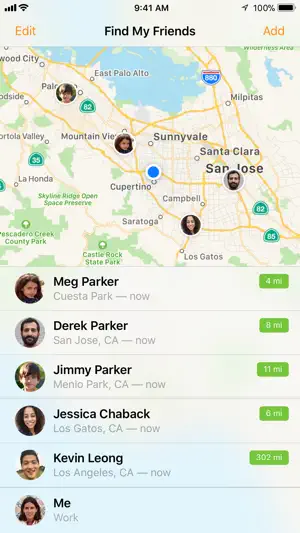
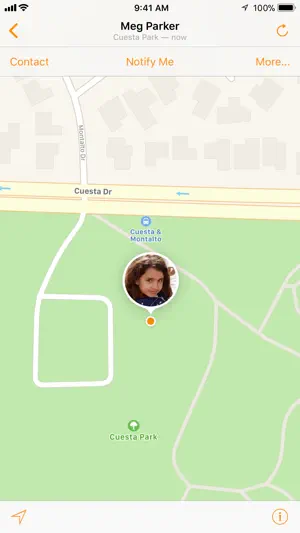
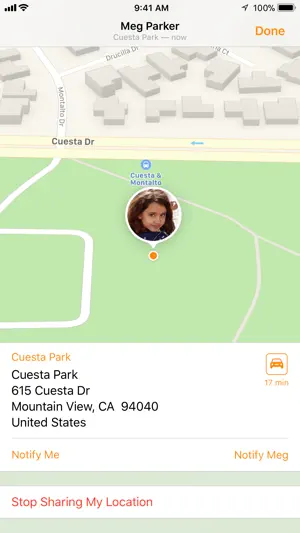
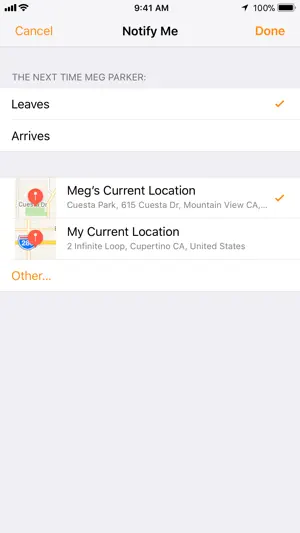
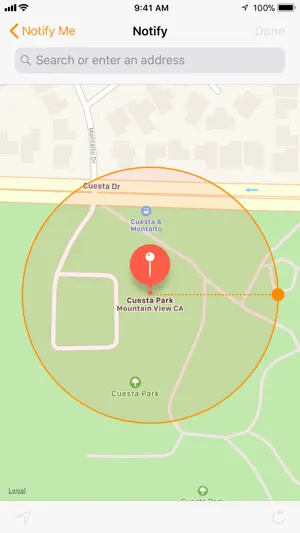


"Find My Friends" is a location-sharing app that allows users to connect with friends and family in real-time. One of its primary features is the ability to see the live location of friends on a map, making it easier to coordinate meetups or ensure safety. Users can send requests to share their location, and once accepted, they can view each other's whereabouts. The app also includes notifications, alerting users when friends arrive or leave specific locations, which can be particularly useful for parents keeping track of their children.
Another notable feature is the ability to create geofences, which are virtual boundaries that trigger alerts when friends enter or exit designated areas. This can enhance safety and provide peace of mind. Additionally, the app integrates seamlessly with other Apple services, allowing users to share their location through iMessage or other platforms. Privacy settings are also robust, enabling users to control who can see their location and for how long. Overall, "Find My Friends" combines convenience and safety, making it a valuable tool for maintaining connections with loved ones.
Using "Find My Friends" is straightforward and user-friendly. To get started, download the app from the App Store if it’s not already installed on your device. Once opened, you’ll need to sign in with your Apple ID. After signing in, you can invite friends to share their locations by sending them a request through the app. They will need to accept your request to start sharing their location with you.
Once your friends have accepted your request, you can view their locations on a map. You can also set up notifications to alert you when friends arrive or leave specific locations. To do this, simply tap on a friend’s name and select the option to add a notification. Additionally, you can manage your privacy settings to control who can see your location and for how long. Remember to communicate with your friends about sharing locations to ensure everyone is comfortable with the arrangement. Overall, the app is designed to enhance connectivity and safety among friends and family.
"Find My Friends" offers several advantages that make it a popular choice for location sharing. One of the main pros is its ease of use; the interface is intuitive, allowing users to quickly navigate and find friends. The real-time location tracking feature is particularly beneficial for parents who want to keep tabs on their children’s whereabouts. Additionally, the app’s integration with other Apple services enhances its functionality, making it a convenient tool for iPhone users. The ability to set geofences and receive notifications adds an extra layer of safety and convenience.
However, there are also some drawbacks to consider. Privacy concerns are a significant issue, as sharing your location can make some users uncomfortable. While the app does offer privacy settings, not everyone may feel secure sharing their whereabouts. Additionally, the app is limited to Apple devices, which means that users with Android phones cannot access its features. Battery consumption can also be a concern, as continuous location tracking may drain the device’s battery more quickly. Overall, while "Find My Friends" has its benefits, users should weigh these pros and cons before deciding to use the app.

 #N/A
#N/A 
 #N/A
#N/A  Google Play
  App Store
 Spotify Wrapped is an annual feature that summarizes your listening habits, including your most-played songs and artists of the year.
To create a playlist, click "Your Library," then "Playlists," and select "Create Playlist." Add songs by searching or browsing.
Yes, with a Spotify Premium subscription, you can download songs and playlists for offline listening.
Spotify offers a free tier with ads, as well as a Premium subscription that removes ads and adds features.
Click the three dots next to the song, select "Share," and choose your preferred sharing method, like social media or a link.