Category: Comics
Developer: CLZ
 Verified App


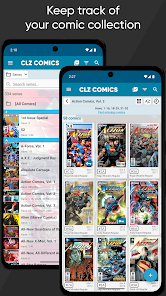
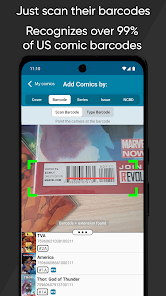
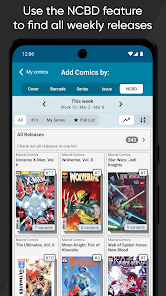
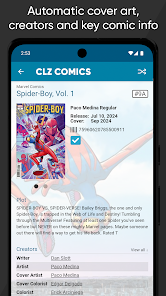
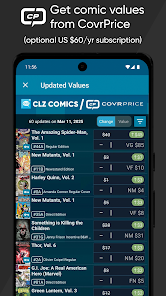
CLZ Comics is a comprehensive comic book database application designed for collectors and enthusiasts. One of its standout features is the ability to catalog your comic book collection effortlessly. Users can add comics by scanning barcodes or searching the extensive online database, which includes detailed information about each comic, such as title, issue number, publisher, and release date. This makes it easy to keep track of what you own and what you still need.
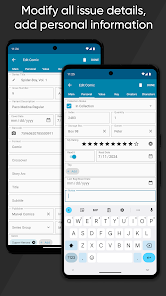
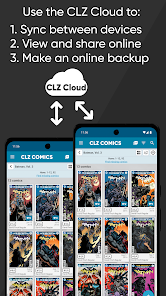
Another notable feature is the customizable collection management system. Users can organize their comics into various categories, such as series, publishers, or personal ratings. The app also allows for the addition of personal notes and images, enhancing the overall experience. Additionally, CLZ Comics offers cloud syncing, enabling users to access their collection from multiple devices. The app also provides a powerful search function, making it simple to find specific comics quickly. Overall, CLZ Comics is a robust tool for anyone looking to manage their comic book collection efficiently.
Using CLZ Comics is straightforward and user-friendly, making it accessible for both novice and experienced collectors. To get started, download the app from your device's app store and create an account. Once logged in, you can begin adding comics to your collection. The app allows you to add comics by scanning their barcodes or searching for them in the online database. This feature significantly speeds up the cataloging process.
After adding comics, you can organize them into various categories based on your preferences. The app also allows you to track your wish list, making it easier to manage future purchases. You can customize your collection by adding personal notes, images, and ratings for each comic. Additionally, the cloud syncing feature ensures that your collection is always up-to-date across all your devices. Regularly exploring the app's features will help you maximize its potential and enhance your comic book collecting experience.
CLZ Comics offers several advantages that make it a popular choice among comic book collectors. One of the primary benefits is its extensive database, which includes a vast array of comic titles, making it easy to find and catalog your collection. The barcode scanning feature is another significant advantage, allowing for quick and efficient entry of new comics. Additionally, the app's user-friendly interface and customizable organization options enhance the overall user experience.
However, there are some drawbacks to consider. One of the main cons is that CLZ Comics requires a subscription for full access to its features, which may not be ideal for casual collectors. Some users have also reported occasional syncing issues, which can be frustrating. Additionally, while the app is designed for ease of use, new users may initially find the range of features overwhelming. Balancing these pros and cons is essential for anyone considering CLZ Comics as their comic book database solution.

 Access a vast collection of comic book titles and issues. Easily track your comic book inventory and wish list. Discover detailed information about creators and story arcs. Enjoy seamless organization with customizable sorting and filtering options. Connect with a community of fellow comic book enthusiasts and collectors.
 Limited user interface options can hinder navigation and discovery. Outdated information may lead to inaccuracies in comic details. Subscription costs may be a barrier for casual users.
  Google Play
  App Store
Excellent! Easy to use, fast, saves me time. My only goal was to create a DB of my old comics. This gave me all of that and so much more. I didn't even know what I had, this showed me the value (other than my memories of enjoying comics) I possibly have. For now (with the right frame) this has pinpointed new artwork for my walls. Thanks for a great app!!
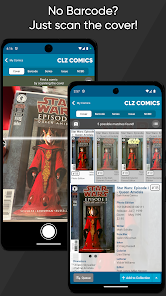
This is an awesome app for tracking comics. I love that I can add comics using images or scanning the bar code. The wish list feature is great too; perfect to reference when you're at the comic shop. Being able to set default values for scans is also pretty cool. Definitely worth the subscription.
This is an outstanding app for managing comic book collections, large or small. The app makes it easy to add books, add notes or details about a book, and links to a source that allows it to pull in values. Lots of cool new features are added monthly and it's clear that the CLZ folks are very passionate about it. An indispensable app for me.
For most of my life I've avoided getting into comics because the sheer volume of content out there, as well as the challenge of keeping up with new releases, intimated me. I finally decided to take the plunge, and this app has been invaluable to me on my comics journey. This app is packed with features that make it easier for me to let go of stress and just enjoy my hobby like the NCBD pull list, Missing Comics search, and the vast core of comic data. Well worth the subscription!
This app is great! It is very handy if you are at the comic shop and you are looking through back issue bins. You can just pull up the app to figure out which issues you are after. It also works well for new issues too. As many variant covers there are these days, the app has every issue with all the variant covers listed. I'm not sure what I'd do without it! It also has functions that let you keep track of signed books and if you have them slabbed, down to having the various labels cgc uses.
Review Source: Google Play store public user reviews.
Yes, CLZ Comics encourages users to submit suggestions and feedback through their support channels or community forums.
CLZ Comics may collect personal data to provide its services, but users can review its privacy policy for detailed information on data handling practices.
Yes, CLZ Comics allows users to access their collection offline, although some features may require an internet connection.
Users can cancel their subscription through their account settings in the app or by contacting customer support for assistance.
Subscription prices for CLZ Comics vary based on the plan selected, with options for monthly or annual billing.
Unfortunately, customer numbers cannot be changed. If you need assistance, please contact customer service for support.
To activate your account, simply log in with your customer number and follow the on-screen instructions to complete the activation process.
You can reach our customer service via the support section on our website or by emailing support
Log in to your account, navigate to account settings, and update your email address there. Save the changes to ensure it's updated.
If your account is activated and you're still unable to log in, double-check your login credentials and contact customer service for additional help.
Fixed:* Sync with CLZ Cloud: Updates: Custom covers did not download correctly