
Version: 4.11.3
Developer: Viz Media
 Verified App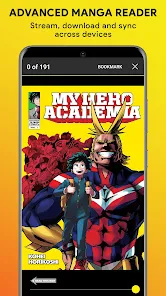

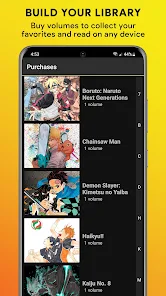
"Shonen Jump Manga & Comics" offers a plethora of features that cater to manga enthusiasts. One of the standout features is its extensive library, which includes a vast collection of popular titles such as "Naruto," "One Piece," and "My Hero Academia." Users can access both classic and new series, ensuring a diverse reading experience. The app is designed for easy navigation, allowing readers to search for specific titles or browse through various genres effortlessly.
Another notable feature is the ability to read chapters as soon as they are released in Japan, often on the same day. This timely access keeps fans engaged and up-to-date with their favorite series. Additionally, the app supports offline reading, enabling users to download chapters and enjoy them without an internet connection. The user-friendly interface and customizable reading settings, such as adjusting brightness and page layout, enhance the overall reading experience. Furthermore, the app frequently updates its content, providing users with fresh material regularly.
Using "Shonen Jump Manga & Comics" is straightforward and user-friendly. First, download the app from your device's app store, whether it be iOS or Android. Once installed, create an account or log in if you already have one. The app offers a free trial, allowing new users to explore its features before committing to a subscription. After logging in, you can browse the extensive library of manga titles, which are organized by popularity, genre, and new releases.
To start reading, simply select a title that interests you. You can read individual chapters or entire volumes, depending on your preference. The app also allows you to bookmark your favorite series for easy access later. For those who enjoy sharing their thoughts, the app includes a community feature where users can discuss chapters and connect with fellow fans. Lastly, remember to check for updates regularly, as new chapters are added frequently, ensuring you never miss out on the latest developments in your favorite series.
The "Shonen Jump Manga & Comics" app comes with several advantages that make it appealing to manga fans. One of the primary pros is its affordability; the subscription fee is relatively low compared to purchasing individual volumes. Additionally, the app provides immediate access to a vast library of titles, including both ongoing and completed series. The ability to read new chapters as they are released in Japan is another significant benefit, keeping readers engaged with the latest storylines. The offline reading feature is also a plus, allowing users to enjoy their favorite manga without needing an internet connection.
However, the app is not without its drawbacks. Some users may find the selection limited compared to physical manga collections, as not all titles are available. Additionally, while the app is generally user-friendly, some users have reported occasional bugs or glitches that can disrupt the reading experience. The subscription model may also deter casual readers who prefer to purchase individual volumes rather than commit to a monthly fee. Overall, while the app offers many benefits, potential users should weigh these pros and cons before deciding to subscribe.

 #N/A
#N/A 
 #N/A
#N/A Spotify Wrapped is an annual feature that summarizes your listening habits, including your most-played songs and artists of the year.
To create a playlist, click "Your Library," then "Playlists," and select "Create Playlist." Add songs by searching or browsing.
Yes, with a Spotify Premium subscription, you can download songs and playlists for offline listening.
Spotify offers a free tier with ads, as well as a Premium subscription that removes ads and adds features.
Click the three dots next to the song, select "Share," and choose your preferred sharing method, like social media or a link.













 Google Play
  App Store