


Category: Communication
Developer: CallApp Caller ID, Call Recorder & Spam Blocker
 Verified App



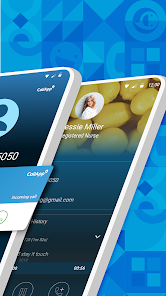
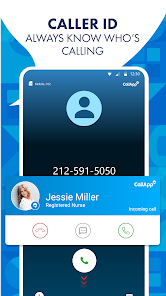
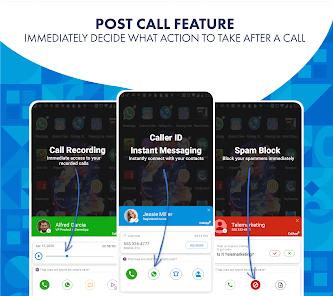
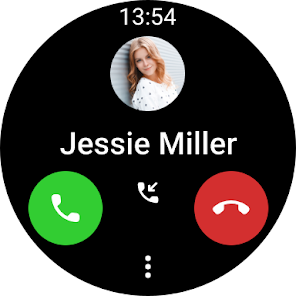
"CallApp: Caller ID & Block" is a comprehensive application designed to enhance your calling experience. One of its standout features is its advanced caller identification system, which allows users to see the name and photo of incoming callers, even if they are not saved in the contact list. This feature helps in identifying unknown numbers and avoiding spam calls.
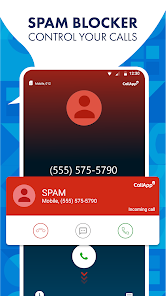
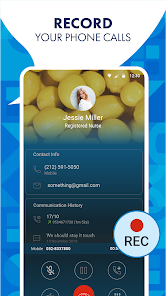
Another significant feature is the call blocking functionality, which enables users to block unwanted calls from telemarketers, robocalls, and other nuisance callers. The app also offers a powerful search tool that allows users to look up phone numbers and find out more about them. Additionally, "CallApp" provides a call recording option, allowing users to record important conversations for future reference.
The app also includes a customizable interface, allowing users to personalize their experience with different themes and settings. Furthermore, it offers a social media integration feature, enabling users to connect with their contacts through various platforms. Overall, "CallApp" combines utility and user-friendliness, making it a popular choice for those looking to manage their calls effectively.
Using "CallApp: Caller ID & Block" is straightforward and user-friendly. After downloading and installing the app from the Google Play Store, users need to grant the necessary permissions for the app to access contacts, calls, and storage. This access is crucial for the app to function effectively, as it relies on this information to provide caller ID and blocking features.
Once the app is set up, users can customize their preferences in the settings menu. This includes options for call blocking, notification settings, and themes. To identify an incoming call, simply wait for the app to display the caller's information on the screen. If you wish to block a number, you can do so by selecting the number from your call log and choosing the block option. Additionally, users can search for unknown numbers directly within the app to gather more information.
For recording calls, users can enable the recording feature in the settings. This allows for automatic recording of calls, which can be accessed later. Overall, "CallApp" is designed to be intuitive, making it easy for users to manage their calls and enhance their communication experience.
Like any application, "CallApp: Caller ID & Block" has its advantages and disadvantages. One of the primary pros is its robust caller identification feature, which helps users identify unknown callers and avoid spam. The app's call-blocking functionality is also highly effective, providing users with peace of mind by reducing unwanted interruptions. Additionally, the call recording feature is a valuable tool for those who need to keep track of important conversations.
On the downside, some users may find that the app consumes a significant amount of battery life, especially if the call recording feature is enabled. There may also be occasional inaccuracies in caller identification, particularly with less common numbers. Furthermore, while the app is free to use, some features may require in-app purchases or subscriptions, which could deter users looking for a completely free solution.
In summary, "CallApp: Caller ID & Block" offers a range of useful features that enhance the calling experience, but potential users should weigh the pros and cons to determine if it meets their needs.

 Identify unknown callers instantly for enhanced security. Block unwanted calls effortlessly to reduce interruptions. Access detailed caller information to make informed decisions. Customize call blocking settings to suit your preferences. Enjoy a user-friendly interface that simplifies navigation and usage.
 Limited database may miss some unknown callers Frequent ads can interrupt user experience May drain battery life due to constant background activity
  Google Play
  App Store

I've changed my mind. After having this app for a couple of years, it is now putting up full-screen ads with no way to shut them off, so while the ad is up, you can't text, call, read your texts at all until it decides on its own to take the add down. It usually puts yet another ad up, which you can't turn off either. It's a major inconvenience at best and at worst, it could prevent the phones use in an emergency. I can just see a lawsuit coming from somewhere, when emergency responders can't b
Excellent app for blocking calls. However, I have one complaint. I have a message in my messages spam list that is on my contact list in the phone. Furthermore, there is no way to move that message into my accepted messages. As such, I've downgraded the app to a 4-Star rating. I have also purchased the Premium plan--which is a one-time cost that is less than other annual spam call-blocking apps available. And I have made comparisons for features, and they tie.
I've used this app for a couple of days. I wanted to see how it was doing with recording the calls. I've poked through all the menus, corners, and options I could find in the app but I can't find any mention of recording calls, though it states here in Play that it records calls. I will email customer support in a few minutes. If they tell me I need to sibscribe to get the recording functionality, I will immediately delete this app. I gladly will pay for a subscription but not UNTIL AFTER Io
app makes pop ups that can interrupt what your doing. I had to completely restart a service because the popup essentially closed the program. it also doesn't have voicemail. and for whatever reason it just doesn't work like the phone app it'll make a double ring when it rings. also, it's very easy to miss a missed call. it also did nothing to help with spam Don't waste your money
I was just about to change my number because the spam calls have gotten so out of control. I figured I give a few spam blockers a try first. After going through them all, and being asked to pay after a trial, I found this one. Which seems so perfect already, I can't imagine how the paid version could make it even better. And unlike the other apps of its kind, the free version sold itself. I will definitly be purchasing! I have "do not disturb" turned off for the 1st time in months! Yay!
Review Source: Google Play store public user reviews.
CallApp may collect certain personal data to enhance user experience, such as contact information and call logs, but it typically emphasizes user privacy and data protection.
CallApp offers a free version with basic features, while some advanced functionalities may require a subscription or in-app purchases.
Yes, CallApp requires an internet connection to provide real-time caller identification and to access its database for blocking unwanted calls.
You can contact support or send feedback through the app's settings menu, where you will find options for customer support or feedback submission. Alternatively, you can visit the official website for more contact information.
You can manage or cancel your subscription through your app store account settings or within the app's subscription management section. Detailed instructions are usually provided in the app.
Unfortunately, customer numbers cannot be changed. For further assistance, please contact customer service.
Yes, you can recover your login details by following the 'Forgot Password' link in the app.
You can reach our customer service through the app's settings or by visiting our website for support options.
Open the app, tap on the log in button, and enter your credentials to access your account.
You can contact customer service via the app or our website for help with activation issues.
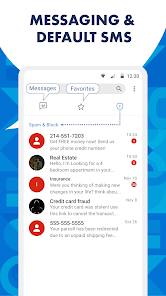
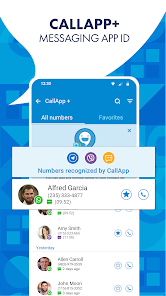
* Our new SMS feature is finally here, and we're excited to make communication with all your contacts easier than ever.With our advanced feature, you not only can send and receive messages easily, but also be sure you're safe from spam messages.* New Caller ID for WhatsApp, Viber and Telegram calls* Bug fixesWe regularly update our app so you can have the best communication experience!