Version: 4.10.3
Developer: Speed Software
 Verified App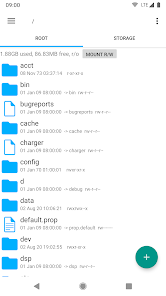
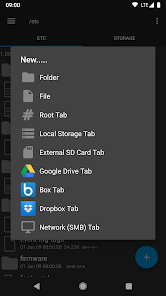
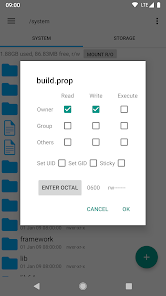
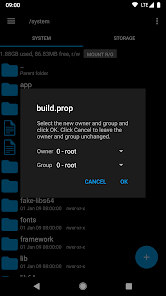
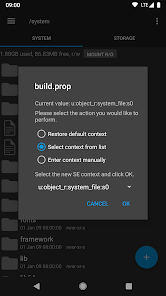
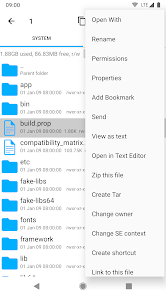
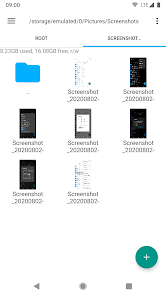
Root Explorer is a powerful file management tool designed specifically for Android devices that have been rooted. One of its standout features is the ability to access the entire file system, including system files and folders that are typically hidden from standard file explorers. This allows users to modify system files, which can be essential for advanced customization and troubleshooting.
Another notable feature is its support for multiple file formats, enabling users to open and manage various types of files seamlessly. The app also includes a built-in text editor, which is useful for editing configuration files directly. Additionally, Root Explorer supports cloud storage services, allowing users to easily transfer files between their device and cloud accounts like Google Drive and Dropbox.
Moreover, it offers a robust search function, making it easy to locate specific files or folders. The app also includes features like batch file operations, zip file support, and the ability to change file permissions, which are crucial for users looking to manage their device's files effectively. Overall, Root Explorer is an essential tool for anyone looking to take full control of their rooted Android device.
Using Root Explorer is straightforward, even for those who may not be tech-savvy. After downloading and installing the app, users will need to grant it root permissions to access the full file system. Upon launching the app, the user interface presents a clean layout with easy navigation options, allowing users to browse through directories effortlessly.
To access system files, simply navigate to the root directory, which is typically labeled as “/”. From there, users can explore various folders, such as “system,” “data,” and “cache.” To perform actions like copying, moving, or deleting files, users can long-press on the desired file or folder to bring up a context menu with available options. The built-in search feature can also be utilized to quickly find specific files.
For those looking to edit files, Root Explorer includes a text editor that can be accessed by selecting a file and choosing the edit option. After making changes, users can save the file directly within the app. It’s important to exercise caution when modifying system files, as incorrect changes can lead to system instability. Overall, Root Explorer provides a user-friendly experience for managing files on rooted Android devices.
Root Explorer comes with a variety of advantages that make it a popular choice among Android users. One of the primary benefits is its comprehensive access to the device's file system, allowing users to manage files that are otherwise restricted. This feature is particularly useful for advanced users who want to customize their devices or troubleshoot issues. Additionally, the app's intuitive interface makes it easy to navigate, even for those who may not be familiar with file management.
However, there are some drawbacks to consider. One significant con is that Root Explorer requires root access, which may void the warranty of the device and pose security risks if not managed properly. Furthermore, while the app is generally stable, some users have reported occasional bugs or crashes, particularly when handling large files. Lastly, Root Explorer is a paid app, which may deter some users who are looking for free alternatives.
In summary, while Root Explorer offers powerful features and ease of use for managing files on rooted devices, potential users should weigh the pros and cons carefully, especially regarding security and warranty implications. For those who are comfortable with rooting and seek advanced file management capabilities, Root Explorer is a valuable tool.

 #N/A
#N/A 
 #N/A
#N/A  Google Play
  App Store
 Spotify Wrapped is an annual feature that summarizes your listening habits, including your most-played songs and artists of the year.
To create a playlist, click "Your Library," then "Playlists," and select "Create Playlist." Add songs by searching or browsing.
Yes, with a Spotify Premium subscription, you can download songs and playlists for offline listening.
Spotify offers a free tier with ads, as well as a Premium subscription that removes ads and adds features.
Click the three dots next to the song, select "Share," and choose your preferred sharing method, like social media or a link.