
 Home
Home  Apps
Apps  Games
Games  Windows
  Topics
  About Us
  Cookies & Privacy Policy
  Terms of Service
LINE: Calls & Messages


Advertisement





Information
- Category: Communication
- Price: 0
- Age Rating: Everyone
- Rating: 3.6
- Developer: LINE (LY Corporation)
- Version: 45609
Advertisement
LINE: Calls & Messages is a versatile communication app that allows users to connect seamlessly through free voice calls, video calls, and instant messaging. With a user-friendly interface, LINE offers a range of features including stickers, group chats, and social networking elements, making it a popular choice for staying in touch with friends and family. Enjoy secure and reliable communication anytime, anywhere, with LINE's innovative tools and engaging content.
Features of "LINE: Calls & Messages"
"LINE: Calls & Messages" is a versatile communication app that offers a wide range of features designed to enhance user interaction. One of its standout features is the ability to send free text messages and make voice calls over the internet, allowing users to connect without incurring traditional phone charges. The app supports multimedia sharing, enabling users to send photos, videos, and voice messages effortlessly.
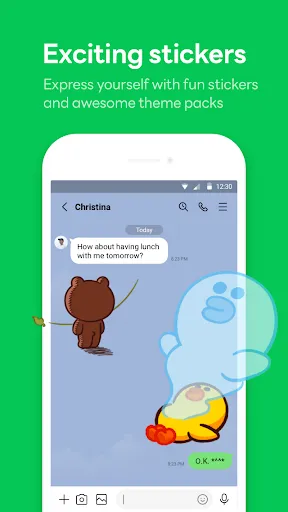
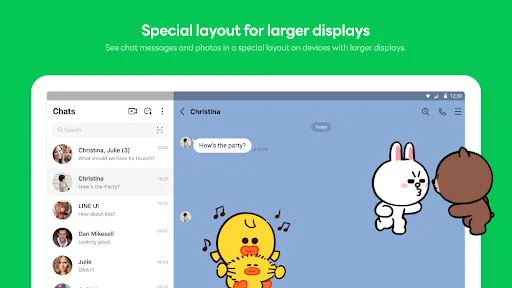
Another notable feature is the availability of stickers and emojis, which add a fun and expressive element to conversations. LINE also includes a timeline feature, where users can share updates, photos, and thoughts with friends, similar to social media platforms. Group chats are another essential aspect, allowing multiple users to communicate simultaneously, making it ideal for friends and family gatherings.
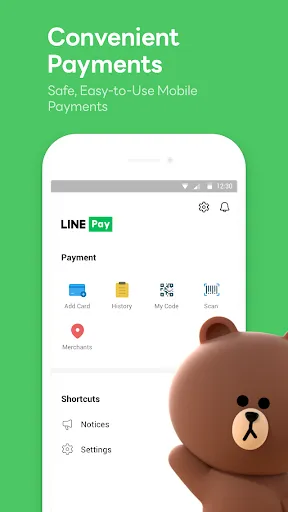
Additionally, LINE offers a built-in wallet for making payments and transferring money, enhancing its functionality beyond just messaging. The app also provides various privacy settings, ensuring users can control who sees their information and messages. Overall, "LINE: Calls & Messages" combines traditional messaging with innovative features, making it a popular choice for users worldwide.
How to Use "LINE: Calls & Messages"
Using "LINE: Calls & Messages" is straightforward and user-friendly. To get started, download the app from your device's app store and create an account using your phone number. Once registered, you can customize your profile by adding a profile picture and a display name, making it easier for friends to recognize you.
After setting up your account, you can begin adding contacts by syncing your phone's address book or inviting friends to join LINE. To send a message, simply select a contact or group, type your message, and hit send. You can also share images, videos, and stickers by tapping the respective icons within the chat interface.
For voice or video calls, select the contact you wish to call and tap the call icon. The app will connect you over the internet, allowing for high-quality communication. Explore the various features, such as group chats and the timeline, to fully utilize the app's capabilities. Regular updates ensure that the app remains user-friendly and packed with new functionalities, enhancing your overall experience.
Pros & Cons of the App
"LINE: Calls & Messages" comes with several advantages that make it appealing to users. One of the primary benefits is its cost-effectiveness; users can make free calls and send messages without incurring traditional phone charges, provided they have an internet connection. The app's rich multimedia features, including stickers and emojis, enhance communication, making conversations more engaging and fun.
Moreover, LINE's group chat functionality allows for seamless communication among multiple users, which is perfect for coordinating events or staying in touch with family and friends. The app also prioritizes user privacy, offering various settings to control who can see your information. However, there are some drawbacks to consider. The app may consume significant data, especially during voice and video calls, which could be a concern for users with limited data plans.
Additionally, while LINE is popular in certain regions, it may not have as large a user base in others, potentially limiting your ability to connect with friends who do not use the app. Lastly, some users may find the interface cluttered due to the abundance of features, which could be overwhelming for new users. Balancing these pros and cons can help users determine if "LINE: Calls & Messages" is the right communication tool for their needs.
Advertisement
Check All Versions  Google Play
  App Store
Google Play App Store Advertisement
Similar Apps





Top Apps

Lucky Patcher
Tools
4.5

Cocomelon
Parenting
4.5

Angry Birds
Games
4.8

SHAREit: Transfer, Share Files
Tools
4.3

PlutoTV: Live TV & Free Movies
Entertainment
3.7

Green Dot - Mobile Banking
Finance
3.6

Doxcy
Tools
4.9

Telegram
Social
4.3

Fox News - Daily Breaking News
News & Magazines
3.2

UC Browser-Safe, Fast, Private
Communication
4.4

CashApp
Finance
4.3

Hangouts
Communication
4.8
Advertisement