
 Home
Home  Apps
Apps  Games
Games  Windows
  Topics
  About Us
  Cookies & Privacy Policy
  Terms of Service
Whova - Event & Conference App


Advertisement
Information
- Category: Business
- Price: free
- Age Rating: Teen
- Rating: 4.9
- Developer: Whova
- Version: 11.6.7
Advertisement
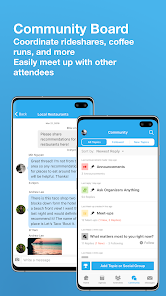
Whova is an all-in-one event and conference app designed to enhance attendee engagement and streamline event management. With features like personalized agendas, networking opportunities, and interactive maps, Whova helps participants make the most of their experience. Organizers can easily manage registrations, communicate with attendees, and gather feedback, ensuring a successful event. Whether you're attending or hosting, Whova transforms the way you connect, learn, and collaborate at events.
Features of "Whova - Event & Conference App"
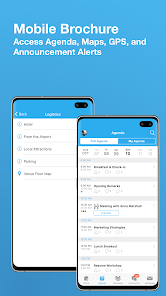
Whova is a comprehensive event and conference management app designed to enhance the experience for both organizers and attendees. One of its standout features is the personalized agenda, which allows users to customize their schedules by selecting sessions, workshops, and networking events that interest them. This feature ensures that attendees can make the most of their time at the event.
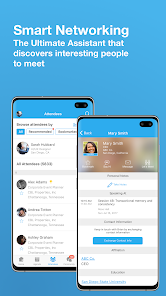
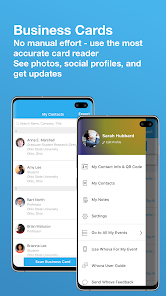
Another key feature is the attendee networking tool, which facilitates connections among participants through in-app messaging and profile sharing. This encourages meaningful interactions and helps attendees build valuable professional relationships. Additionally, Whova offers a robust exhibitor and sponsor management system, enabling organizers to showcase exhibitors effectively and provide attendees with easy access to their information.
The app also includes real-time updates and notifications, ensuring that users stay informed about any changes or important announcements during the event. Furthermore, Whova supports interactive features such as live polls and Q&A sessions, enhancing audience engagement. Overall, Whova combines functionality and user-friendliness, making it an essential tool for successful event management.
How to Use "Whova - Event & Conference App"
Using the Whova app is straightforward and user-friendly. First, download the app from the App Store or Google Play and create an account. Once registered, you can search for your specific event by entering the event name or scanning a QR code provided by the organizers. After finding your event, you can access the event agenda, speaker information, and attendee list.
To personalize your experience, navigate to the agenda section and select the sessions you wish to attend. You can also set reminders for these sessions to ensure you don’t miss them. The networking feature allows you to connect with other attendees by sending messages or scheduling meetings directly through the app. Additionally, you can participate in live polls and Q&A sessions during presentations, making your experience more interactive.
Throughout the event, keep an eye on the notifications for any updates or changes. After the event, you can continue to use Whova to access materials, connect with attendees, and provide feedback. Overall, Whova is designed to streamline the event experience, making it easier for users to engage and network effectively.
Pros & Cons of the App
Whova offers numerous advantages that make it a popular choice for event organizers and attendees alike. One of the primary pros is its user-friendly interface, which simplifies navigation and enhances the overall experience. The app's networking capabilities are also a significant benefit, allowing users to connect easily with other attendees and speakers, fostering valuable professional relationships. Additionally, the customizable agenda feature helps users tailor their experience to their interests, ensuring they get the most out of the event.
However, there are some drawbacks to consider. Some users have reported occasional technical glitches, such as slow loading times or issues with notifications. Additionally, while the app is feature-rich, it may feel overwhelming for first-time users who are not familiar with its functionalities. Lastly, the effectiveness of the networking features can vary depending on the level of engagement from other attendees, which may limit the potential for meaningful connections.
In summary, while Whova has its pros and cons, its strengths in enhancing event experiences and facilitating networking make it a valuable tool for both organizers and participants.
Advertisement
 Google Play
  App Store
 Advertisement
Similar Apps






Top Apps

Lucky Patcher
Tools
4.5

Cocomelon
Parenting
4.5

Angry Birds
Games
4.8

SHAREit: Transfer, Share Files
Tools
4.3

PlutoTV: Live TV & Free Movies
Entertainment
3.7

Green Dot - Mobile Banking
Finance
3.6

Doxcy
Tools
4.9

Telegram
Social
4.3

Fox News - Daily Breaking News
News & Magazines
3.2

UC Browser-Safe, Fast, Private
Communication
4.4

CashApp
Finance
4.3

Hangouts
Communication
4.8
Advertisement