
Category: Play Pass
Developer: joaomgcd
 Verified App


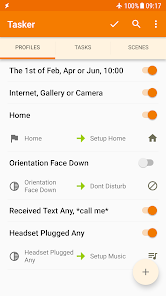
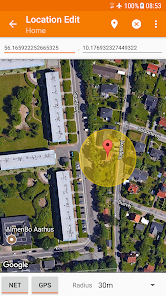
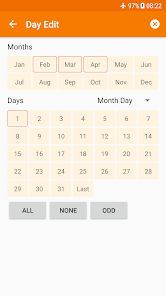
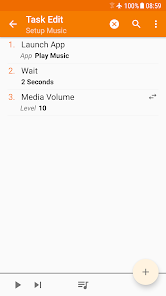
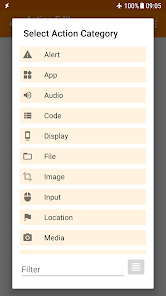
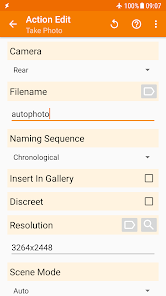
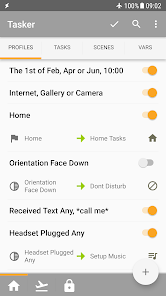
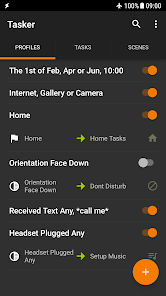
Tasker is a powerful automation app for Android that allows users to create custom tasks and automate various functions on their devices. One of its standout features is the ability to trigger actions based on specific contexts, such as location, time, or event. This means you can set your phone to perform certain actions when you arrive at a particular place or at a specific time of day.
Another notable feature is the extensive range of actions that can be automated. Users can control settings like Wi-Fi, Bluetooth, and screen brightness, as well as send SMS messages, launch apps, and even interact with third-party applications. Tasker also supports plugins, which expand its capabilities even further, allowing for integration with other apps and services.
Tasker’s user interface, while initially complex, offers a robust environment for creating detailed automation scripts. Users can create profiles that define the conditions under which tasks are executed, making it highly customizable. Additionally, Tasker supports variables and loops, enabling users to create intricate automation sequences tailored to their specific needs.
Using Tasker begins with downloading and installing the app from the Google Play Store. Once installed, users can start by creating a new profile, which serves as the trigger for an automation task. To do this, tap on the "+" icon and select a context, such as "Location" or "Time." After defining the context, you can then create a task that will execute when the specified conditions are met.
To create a task, navigate to the "Tasks" tab and tap the "+" icon. Here, you can add various actions, such as sending a text message or changing device settings. Each action can be customized with specific parameters to suit your needs. Once your task is created, link it back to the profile you set up earlier.
Testing your automation is crucial. You can manually trigger the profile to ensure everything works as intended. Tasker also allows for debugging, so you can troubleshoot any issues that arise. As you become more familiar with the app, you can explore advanced features like variables, loops, and plugins to enhance your automation experience.
Tasker offers numerous advantages, making it a favorite among automation enthusiasts. One of its primary benefits is its flexibility; users can automate virtually any aspect of their Android device, from simple tasks to complex sequences. The app's extensive customization options allow for tailored solutions that can significantly enhance productivity and convenience.
Another pro is the active community surrounding Tasker, which provides a wealth of resources, tutorials, and user-created profiles. This support can help new users get started and inspire advanced users to explore more complex automations. Additionally, Tasker’s ability to integrate with various plugins expands its functionality, allowing for even more creative automation possibilities.

 Tasker automates repetitive tasks effortlessly, saving you time and effort. It allows for deep customization, tailoring functions to your specific needs. Tasker supports a wide range of apps, enhancing your device's functionality. You can control device settings based on context, improving efficiency and convenience. It enables complex workflows, streamlining processes and boosting productivity.
 Steep learning curve for beginners can be intimidating and time-consuming. Limited support and documentation may hinder troubleshooting and advanced usage. Complex tasks can lead to performance issues on older devices or apps.
  Google Play
  App Store
Tasker takes a bit of learning, but you can do a lot with it. What's really nice though, is the quick response and useful help you get when you request help from the author! I really recommend the program as long as you are able and willing to do some programming. As an example, I get so many Spam calls now a days. So, I made a program to block calls from everyone who isn't in my contact. With my own program, I don't have to worry about privacy issues from sharing things with vendor's servers. (Some apps ask you to share why you block the phone numbers you block in their apps.)
I've been using Tasker since 2013 and it's the first app I load when I upgrade my phone. It's fairly easy to set up, even if you aren't a tech-head. There is a great community of users online that share different profiles they've created, with walk-throughs on how to load them. it's easy to see why this app has over a million downloads. I've seen articles mentioning over FIVE million downloads. In 8 years, I've had one issue. The issue was caused by an android upgrade. I reached out to the developer in a link on the app and he contacted me with the fix a few hours later. Not days... HOURS. Five stars every day of the week.
I have been using Tasker for several years and find it extremely helpful to automate many useful tasks that other automation programs have not been able to. Although Tasker can have a steep learning curve, it is well worth learning and there is an active online community which is very helpful to find how to implement a specific action you want to perform in Tasker. The developer has also been very responsive when I have contacted him in the past.
This app is what makes an Android phone, well, an Android phone. Other "profile" apps are poor substitutes or wannabees. And to pass it up when it's priced at $1.99 should be a punishable crime. And if you can't make it work the way you want, it's no one's fault but your own. It takes a while to ramp up to speed, but it is well worth it. The developer is first class and heavily involved. There are numerous Tasker help resources on the web (Google Groups, Pocketables to name a couple). Take
As a developer, Tasker gives me the kind of power over my device that I could only dream of with my iPhone. It requires you be the type of person who doesn't mind trying things and working to perfect your rules, but if you are that type of person you can do some amazing things. The plugin architecture makes it even more powerful once you grab a few. Be sure to look at the work of 'joaomgcd' in particular.
Review Source: Google Play store public user reviews.
Yes, users can submit suggestions or feedback through the official Tasker forums or support channels, where developers actively engage with the community.
Tasker does not collect personal data from users. However, certain features may require permissions that access device data, which users can manage in the app settings.
Yes, Tasker can operate offline, allowing users to run automated tasks without an active internet connection.
Since Tasker is a one-time purchase app, there is no subscription to cancel; users retain access to the app after purchase without ongoing fees.
Tasker is available for a one-time purchase, rather than a subscription model, and the price may vary based on the app store and region.
Yes, you can recover your account by using the "Forgot Password" option on the login page.
You can reach customer service through the support section on our website or by calling the customer service number listed in your account details.
To activate your account, check your email for an activation link and follow the instructions provided.
To log in, visit the Tasker website or app, enter your email and password, then click the login button.
If you’re having trouble activating your account, check your email for the activation link or contact customer service for assistance.
Release Video: https://bit.ly/tasker6_6_videoComment/More: https://bit.ly/tasker6_6_comment- Shizuku: Root power without root! Logcat is back!- Java Code: Future Proofed Tasker: Write full Java Code actions with access to native APIs with built-in AI assistant!- Offline Sunrise/Sunset: Automate with the sun!- Enhanced Notifications: Status bar chips & group control!- Extra Triggers: Standalone apps for Bixby, Home & more!