
Version: 2025.16.1
Developer: happn
 Verified App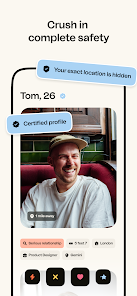
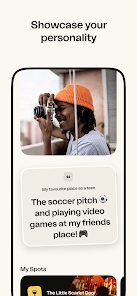

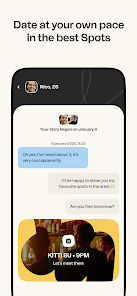

Happn is a unique dating app that focuses on real-life connections by showing users profiles of people they have crossed paths with throughout their day. One of its standout features is the location-based matching system, which allows users to see potential matches who have been nearby within the last 24 hours. This feature encourages spontaneous interactions and makes the dating experience feel more organic.
Another notable feature is the "Crush" function, where users can express interest in someone by liking their profile. If both users like each other, a match is created, allowing them to start chatting. Happn also includes a chat feature that enables users to communicate directly within the app, making it easy to get to know each other before meeting in person. Additionally, users can send "Hello" messages to break the ice, enhancing the chances of starting a conversation. The app also offers a premium subscription that unlocks additional features, such as seeing who liked you and the ability to send unlimited messages.
Using Happn is straightforward and user-friendly. First, download the app from the App Store or Google Play and create an account by signing up with your Facebook or phone number. Once registered, you will need to set up your profile by adding photos and a brief bio that reflects your personality and interests.
After your profile is complete, the app will start showing you profiles of users you have crossed paths with. You can browse through these profiles and express interest by liking them. If someone likes you back, a match is formed, and you can start chatting. To enhance your experience, consider using the app regularly to increase your chances of meeting new people. Remember to keep your profile updated and engage with others respectfully to foster meaningful connections. Overall, Happn is designed to facilitate real-life encounters, making it an exciting option for those looking to date.
Like any dating app, Happn has its advantages and disadvantages. One of the primary pros is its location-based matching system, which allows users to connect with people they have actually encountered in their daily lives. This feature can lead to more authentic connections and makes it easier to meet someone in person. Additionally, the app's user interface is intuitive and easy to navigate, making it accessible for users of all ages.
On the downside, one of the cons of Happn is that it relies heavily on location services, which may not appeal to everyone. Users who travel frequently may find it challenging to maintain connections. Furthermore, the free version of the app has limitations, such as a restricted number of likes per day, which can be frustrating for active users. Lastly, while the app promotes real-life encounters, it may not be as effective in larger cities where users are constantly on the move, making it harder to connect with potential matches. Overall, weighing these pros and cons can help users decide if Happn is the right dating app for them.

 #N/A
#N/A 
 #N/A
#N/A Spotify Wrapped is an annual feature that summarizes your listening habits, including your most-played songs and artists of the year.
To create a playlist, click "Your Library," then "Playlists," and select "Create Playlist." Add songs by searching or browsing.
Yes, with a Spotify Premium subscription, you can download songs and playlists for offline listening.
Spotify offers a free tier with ads, as well as a Premium subscription that removes ads and adds features.
Click the three dots next to the song, select "Share," and choose your preferred sharing method, like social media or a link.













 Google Play
  App Store